

This is my entry to the Coding Train challenge #180 "falling sand".
The challenge was to build a cellular automaton, that simulates falling sand.
See the original video from the Coding Train
Deep dive
With my project I attempted to provide a tool to try out multiple rules, that could lead to the wanted behaviour.
So besides tools to draw 'sand' on the playground and setting the color-representation for the different cell states,
the user is able to configure the rules for this automaton with the 'Configure Rules' button.
The "Export Rules" field shows the currently active rules in json format.
Copy them and paste them into the "Import Rules" field to start changing the rules, or select from the dropdown a predefined definition.
At the bottom of the config-popup a visualization shows the rules that are currently applied in a visual manner.

visual rules
A rule may contain multiple packs of 'condition' and 'apply'-states.
The left side is the 'condition' that has to be met, in order for the right side to be 'applied'.
The condition may check every neighbouring field for the state or ignore a given neighbours state.
The apply state shows the change in value for all neighbours.
A green field increases the value of that cell, a red field decreases it (by 0.5 as default).
The rule definition
The json value is to be interpreted as follows.
{
    "name": "StencilReplaceRule",
    "settings": {
        "stencil_size": {
            "x": 3,
            "y": 3
        },
        "smoothing_enabled": true,
        "smoothing_factor": 0.55,
        "definition": [
		[[
			"*","*","*",
			"*","X","*",
			"*","O","*"
		], [
			"*","*","*",
			"*","-","*",
			"*","+","*"
		]]
	]
    }
}
name
Should only be "StencilReplaceRule" internally there are more rules, that are distinguished by this value, but they are not used.
settings.stencil_size
Always keep this at (x:3,y:3) for now, this would change how many neighbours are considered for the condition and applies.
Not implemented yet.
settings.smoothing_enabled / settings.smoothing_factor
If enabled the factor determines how quickly the values of cells should average out.
The higher the value the faster an equilibrium is reached.
/**
 * @var stencil The current 3 by 3 area of cells being checked.
 * @var source_cell The cell at the center of the current stencil.
 * @var neighbour_count How many neighbours are active (not a wall, and inside simulated area)
 * @var neighbour_average The average value in the neighbourhood
 */

if (this.settings.smoothing_enabled) {
  const offset = (source_cell.value - neighbour_average);
  // determine how much
  spread = Math.round(offset / neighbour_count * (this.settings.smoothing_factor ?? 0.55));
  target_cell.value -= spread * neighbour_count;

  stencil.forEach((cell, index) => {
    if (!cell || cell.fixed) {  // check if cell is inside simulated area
      return;
    }
    const target_cell = target.at(cell.position);
    if (target_cell) {
      const future_cell = future[index];
      if (!target_cell.fixed) { // check if this is a wall and should not change value
        target_cell.value += spread;
      }
    }
  });
}
settings.definition
An array of tuples with a 'condition' and a 'apply'.
Should be of the following form Array<[Array<Cell x 9>, Array<Cell x 9>]>.
The first array are the conditions and the second array defines the applied changes.
The possible values are explained in the config popup.
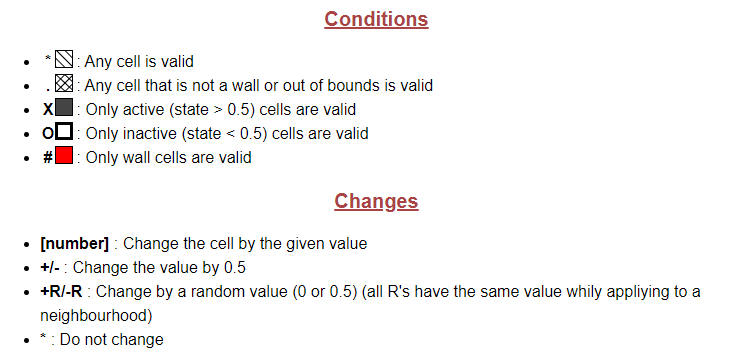
possible values for conditions and applies
Comments